Product-led growth companies face a unique challenge with lifecycle marketing: your users' behaviour in the product should drive your messaging, not arbitrary time delays or generic segments.
That's where Customer.io excels. Unlike traditional ESPs that rely on demographic data and manual triggers, Customer.io lets you build behavioural messaging that responds to what users actually do in your product.
|
TL;DR
|
Why Customer.io Works for PLG Companies
Traditional email platforms (Mailchimp, Marketo, ActiveCampaign) were built for:
- Manual campaigns
- Demographic segmentation
- Time-based triggers
- Static email lists
PLG companies need:
- Event-triggered automation
- Behavioral segmentation
- Real-time response to product usage
- Dynamic user journeys
Customer.io was purpose-built for the second list.
The Core Difference: Events vs. Time
Old approach (traditional ESP):
- Day 1: Send welcome email
- Day 3: Send feature overview
- Day 7: Send case study
- Day 14: Send upgrade prompt
Everyone gets the same sequence regardless of behaviour.
Customer.io approach (behavioural):
- User signs up → Send welcome
- User creates first project → Send activation confirmation
- User inactive for 3 days → Send re-engagement
- User hits usage limit → Send upgrade prompt
- User activates → Exit onboarding, enter engagement sequence
Messages respond to actual behaviour, not calendar days.
This is the difference between generic marketing and lifecycle automation that actually drives activation and retention.
What You Can Build with Customer.io
1. Activation Campaigns
Get users from signup to "aha moment" faster.
- Trigger: User signs up but hasn't completed the activation milestone
- Goal: Drive to the first value experience
- Result: 25-35% higher activation rates vs. time-based onboarding
Example workflow:
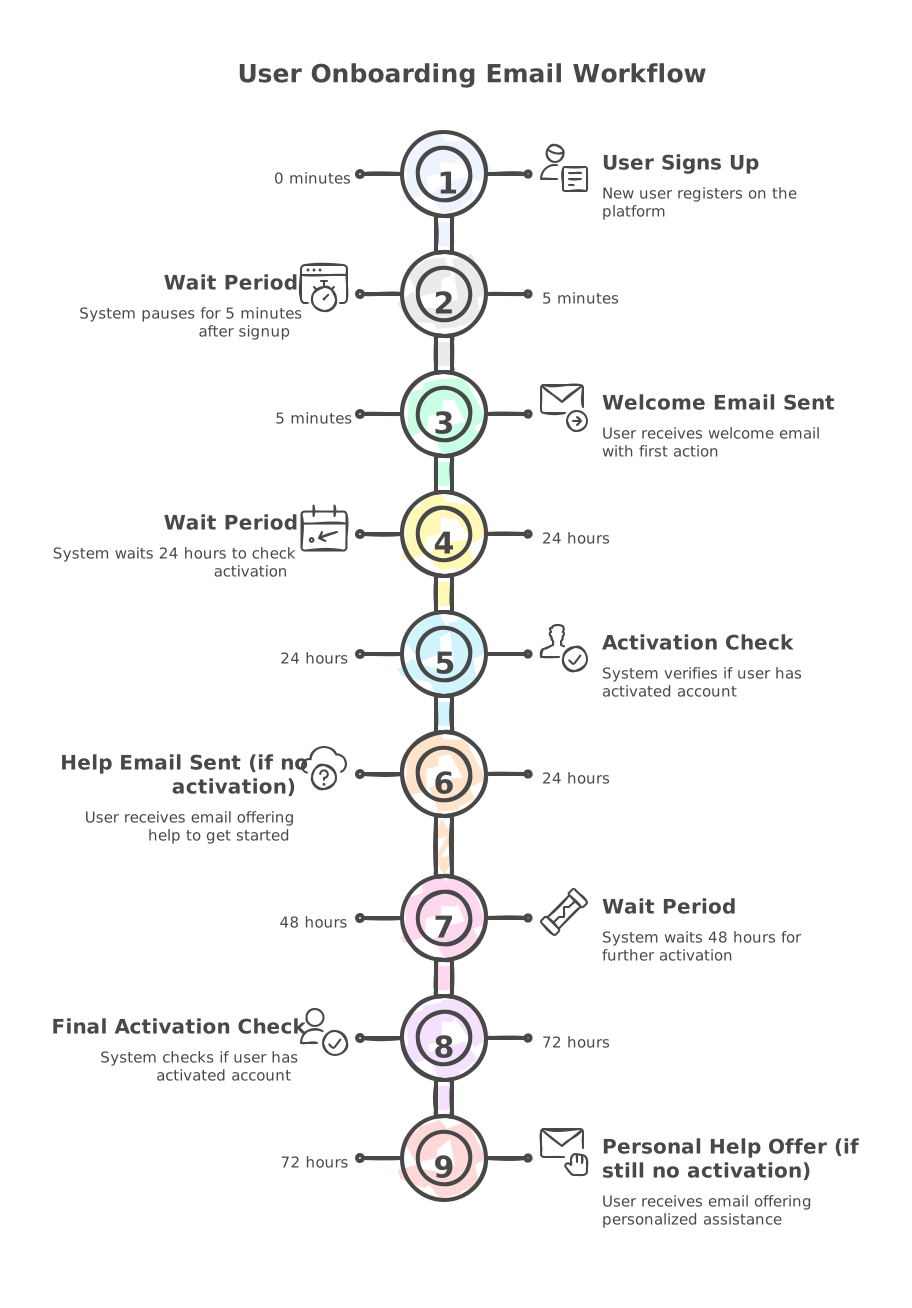
- User signs up → Immediate welcome email with first action
- After 24 hours, if not activated → Send help getting started
- After 3 days, if still not activated → Offer personal walkthrough
- User activates → Exit workflow, enter engagement sequence
2. Re-Engagement Sequences
Bring users back before they churn.
- Trigger: User inactive for 7+ days (but previously active)
- Goal: Return to product
- Result: 20-30% of inactive users return
Example workflow:
- Day 7 inactive → "We miss you" email
- Day 14 inactive → "Here's what you're missing" email
- Day 21 inactive → Personal outreach or incentive
- User returns → Exit workflow, resume normal engagement
3. Upgrade Prompts
Convert free users to paid when they show intent.
- Trigger: User hits usage limit, OR tries paid feature, OR power user behaviour
- Goal: Upgrade to paid plan
- Result: 15-25% conversion rate on prompted users
Example workflow:
- User hits limit → In-app message + email about upgrade
- 3 days later, if not upgraded → Feature showcase email
- 7 days later → Social proof + limited offer
- User upgrades → Exit workflow, enter paid onboarding
4. Trial Expiration Campaigns
Maximise trial-to-paid conversions.
Trigger: Trial end date approaching Goal: Convert before expiration Result: 20-30% trial-to-paid conversion
Example workflow:
- 7 days before expiration → First reminder
- 3 days before → Urgency email with progress shown
- 1 day before → Final push with offer
- Expiration day → Grace period or win-back attempt
5. Usage Milestones
Celebrate achievements to build a habit.
- Trigger: User reaches milestone (10th project, 30-day streak, etc.)
- Goal: Positive reinforcement, habit formation
- Result: 15-25% increase in 30-day retention
Example workflow:
- User hits milestone → Immediate celebration in-app + email
- Show progress and next milestone
- Option to share achievement (viral loop)
Implementation: The Right Way
Phase 1: Planning (Week 1)
Before writing a single line of code:
Map your user journey:
- Signup → Activation → Engagement → Retention → Expansion
- Define what "activated" means for your product
- Identify key milestones along the way
Identify critical events:
Start with 10-15 core events:
signed_up- User created accountemail_verified- Confirmed emailactivated- Reached first value (you define this)project_created- Key action takenteam_member_invited- Collaboration startedfeature_used- Specific capability engagedupgraded- Converted to paiddowngraded- Plan changechurned- Left product
Don't track everything at first. Start with events that matter for lifecycle campaigns.
Define user attributes:
Critical attributes to sync:
plan_type(free, trial, paid, enterprise)activated(boolean)activation_date(timestamp)last_login(timestamp)trial_end_date(if applicable)mrr(monthly recurring revenue)team_size(number)company_name(string)
These power your segmentation and personalisation.
Phase 2: Technical Setup (Week 2)
Choose your integration method:
Option 1: Customer.io JavaScript SDK (for web apps)
javascript
// Initialize
_cio.identify({
  id: 'user_12345',
  email: 'user@company.com',
  created_at: 1702310400,
  plan: 'trial',
  activated: false
});

// Track events
_cio.track('project_created', {
  project_id: 'proj_789',
  project_name: 'Q4 Campaign'
});
Option 2: Server-side Track API (recommended for B2B SaaS)
javascript
// More reliable, not blocked by ad blockers
const customerio = require('customerio-node');
const cio = new customerio.TrackClient(siteId, apiKey);

// Identify user
await cio.identify('user_12345', {
  email: 'user@company.com',
  plan: 'trial',
  activated: false
});

// Track event
await cio.track('user_12345', {
  name: 'project_created',
  data: {
    project_id: 'proj_789'
  }
});
Option 3: Via CDP (Segment) (best for flexibility)
javascript
// Track once, route to multiple tools
analytics.identify('user_12345', {
  email: 'user@company.com',
  plan: 'trial'
});

analytics.track('project_created', {
  project_id: 'proj_789'
});

// Segment routes to Customer.io automatically
We recommend Segment for most Series A+ companies.
Makes it easy to add tools later.
Set up your workspace:
- Configure email authentication (SPF, DKIM, DMARC)
- Verify sending domain
- Set timezone
- Add team members
- Set up suppression lists
Phase 3: Build Your First Campaigns (Week 3-4)
Start with the activation workflow:
This is your highest-ROI campaign. Get this right first.
Trigger: User signs up (`signed_up` event)
Entry criteria:
- Email verified
- NOT activated
-
Account age < 7 days
Subject: "Welcome to [Product]! Here's what to do first"
Hi [first_name],
Welcome to [Product]!
Here's how to get started in the next 5 minutes:
→ [Primary activation action - link]
→ [Secondary setup step - link]
→ [Quick win action - link]
Most teams see results within their first session.
[CTA: "Get Started"]
Need help? Reply to this email.
[Your Name]
Subject: "Quick question about [Product]"
Hi [first_name],
I noticed you signed up yesterday but haven't [activated action] yet.
Is something holding you back?
Common questions:
- "Not sure where to start" → [Quick start guide]
- "Need examples" → [Template library]
- "Want to talk through it" → [Book 15-min call]
[CTA: "Complete Setup in 5 Minutes"]
We're here to help!
Email 3: Personal help (3 days if still not activated)
Subject: "Let me help you get started"
Hi [first_name],
This is [Your Name], [Your Role] at [Product].
I noticed you haven't [activated action] yet. I'd love to help you get value from [Product].
Want a personal walkthrough?
Book 15 minutes: [Calendar link]
I'll show you exactly how to [achieve outcome].
No pressure, I just want to make sure you get started right.
This three-email sequence alone drives 20-30% of activation.
Integration with HubSpot (Critical for PLG)
If you're using HubSpot for CRM and sales, integrate it with Customer.io.
Why this matters:
Without the integration:
- ❌ Sales can't see which campaigns prospects engaged with
- ❌ Marketing doesn't know who's in the sales pipeline
- ❌ Attribution is broken
- ❌ Users get duplicate messages
With the integration:
- ✅ Campaign engagement appears in the HubSpot timeline
- ✅ Deal stages trigger/suppress Customer.io campaigns
- ✅ Sales and marketing operate from the same data
- ✅ Attribution actually works
How to integrate:
Option 1: Native integration (simplest)
- Go to Customer.io → Integrations → HubSpot
- Connect via OAuth
- Map which events sync to HubSpot
- Map properties between systems
Option 2: Via Segment (most flexible)
- Segment → HubSpot destination
- Segment → Customer.io destination
- Both receive the same events automatically
Key data to sync:
Customer.io → HubSpot:
- Email opens/clicks (timeline events)
- Campaign conversions
- Activation status
- Engagement scores
HubSpot → Customer.io:
- Deal stage (suppress campaigns when in sales process)
- Lifecycle stage (coordinate handoffs)
- Owner assignment (pause marketing when sales are active)
- Company data (personalised messaging)
This creates a unified GTM architecture where marketing and sales actually work together.
We've published a complete guide on this integration: HubSpot + Customer.io Integration Architecture Guide
Common Mistakes to Avoid
Mistake 1: Tracking too many events
Bad approach: Track every button click, page view, and micro-interaction.
Result:
- Overwhelmed with data
- Can't identify what matters
- Campaign logic becomes complex
Better approach: Start with 10-15 events that map to your user journey. Add more later if needed.
Mistake 2: Time-based campaigns
Bad approach: "Day 1: Send email A. Day 3: Send email B. Day 7: Send email C."
Result: Users at different stages receive the same message, leading to misalignment with actual behaviour.
Better approach: Behaviour-based triggers. "User did X → Send message Y."
Mistake 3: No activation definition
Bad approach: "Users are activated when they... uh... start using the product?"
Result: Can't measure if campaigns work. Can't exit workflows properly.
Better approach: Clear activation criteria: "User is activated when they take [specific action]."
Examples:
- Created the first project
- Invited team member
- Sent the first campaign
- Connected integration
- Completed setup checklist
Mistake 4: Sending too much, too fast
Bad approach: Five emails in the first week. Daily messages.
Result: High unsubscribe rates. Users feel spammed.
Better approach: Space messages appropriately. Let users breathe. Quality over quantity.
Good cadence for activation:
- Day 0: Welcome
- Day 1: Follow-up (if not activated)
- Day 3: Help offer (if still not activated)
- Then, the weekly educational content
Mistake 5: No suppression logic
Bad approach: Everyone in the segment gets every message, regardless of recent activity.
Result: Active users get "We miss you" emails. Just-purchased users get upgrade prompts.
Better approach: Add exit criteria and suppression rules:
- Don't send re-engagement to users who have been active in the last 3 days
- Don't send upgrade prompts to users who just upgraded
- Pause campaigns when the user enters the sales process
Customer.io vs. Alternatives
Customer.io vs. Marketo
Marketo strengths:
- Enterprise-grade
- Deep Salesforce integration
- Powerful for complex B2B sales cycles
Customer.io strengths:
- Event-based automation (Marketo is clunky here)
- Better for PLG and product-led companies
- Easier to implement and maintain
- Modern UI/UX
- Better deliverability for lifecycle emails
Choose Customer.io if: You're PLG, need behavioural messaging, want modern tooling
Choose Marketo if: You're an enterprise B2B with complex sales cycles and use Salesforce
Customer.io vs. Braze
Braze strengths:
- Multi-channel orchestration (email, push, in-app, SMS)
- Mobile-first design
- Real-time personalisation at scale
Customer.io strengths:
- Easier to implement
- Lower cost for most B2B SaaS companies
- Better for smaller teams
- Better email-focused workflows
Choose Customer.io if: You're a B2B SaaS, email-first, and a smaller team
Choose Braze if: You're B2C, mobile-first, and need complex multi-channel orchestration
Customer.io vs. Iterable
Iterable strengths:
- Workflow Studio (visual builder)
- Good for e-commerce
- Multi-channel campaigns
Customer.io strengths:
- Better event-triggered automation
- Cleaner data model
- Better for B2B SaaS
- Simpler pricing
Choose Customer.io if: You're a B2B SaaS and need event-based automation
Choose Iterable if: You're an e-commerce or B2C with complex customer journeys
Customer.io vs. ActiveCampaign
ActiveCampaign strengths:
- All-in-one (CRM + email + automation)
- Lower cost for small businesses
- Good for service businesses
Customer.io strengths:
- Event-based automation (ActiveCampaign is time-based)
- Better for product-led companies
- More powerful API
- Better HubSpot integration
Choose Customer.io if: You're SaaS/PLG, already have CRM, and need behavioural messaging
Choose ActiveCampaign if: You're a small service business needing all-in-one
Pricing Considerations
Customer.io pricing model:
- Based on "profiles" (unique users)
- Starts ~$100/month for 5,000 profiles
- Scales with usage
- Enterprise plans available
Cost optimisation tips:
1. Archive inactive users: Only pay for users you're actually messaging. Archive churned users.
2. Clean your list regularly: Remove hard bounces, unengaged users from 6+ months ago.
3. Use segments wisely: Don't pay to store users you'll never message.
4. Start small, scale up: Begin with core workflows. Add complexity as you grow.
Typical costs by company stage:
- Seed (0-10K users): $100-500/month
- Series A (10-50K users): $500-2,000/month
- Series B (50-200K users): $2,000-8,000/month
- Series B+ (200K+ users): $8,000-25,000/month
ROI calculation: If Customer.io increases activation by 10% and you have 1,000 signups/month with $100 LTV:
- 100 additional activated users/month
- 100 × $100 = $10,000/month additional revenue
- If you pay $500/month for Customer.io = 20x ROI
The cost is almost always justified for PLG companies.
Getting Started: Your First 30 Days
Week 1: Planning
- Map user journey
- Define activation criteria
- List 10-15 key events
- List 15-20 key attributes
- Choose an integration method
Week 2: Implementation
- Set up the Customer.io workspace
- Implement event tracking
- Test events are flowing correctly
- Verify attributes syncing
Week 3: First Campaign
- Build activation workflow
- Write email copy
- Design email templates
- Test thoroughly in staging
Week 4: Launch
- Soft launch to 10% of users
- Monitor for 48 hours
- Fix any issues
- Full launch to all users
Beyond:
- Monitor metrics weekly
- Add re-engagement workflow
- Add upgrade prompt workflow
- Optimise based on data
Metrics to Track
Campaign Performance
Email metrics:
- Open rate (target: 30-50%)
- Click-through rate (target: 8-15%)
- Unsubscribe rate (target: <0.5%)
- Bounce rate (target: <2%)
Workflow effectiveness:
- Activation rate (target: 25-35%)
- Re-engagement rate (target: 20-30%)
- Conversion rate (target: 15-25%)
- Time to value (days from signup to activation)
Business Impact
Before vs. after Customer.io:
- Activation rate increase
- 30-day retention improvement
- Revenue attributed to campaigns
- Support ticket reduction
Attribution:
- Which campaigns drive activation?
- Which campaigns drive upgrades?
- Which campaigns prevent churn?
- Campaign → revenue mapping
Set up tracking from day one. You can't optimise what you don't measure.
When to Hire an Expert
You can implement Customer.io yourself if:
- You have technical resources (developer or technical marketer)
- You have 4-8 weeks to dedicate to it
- Your use case is relatively standard
- You're comfortable with APIs and webhooks
Consider hiring help if:
- You don't have spare developer time
- You want it done in 4-6 weeks (vs. 3+ months DIY)
- You need HubSpot integration done properly
- You want campaign strategy + implementation
- You're migrating from another ESP
What professional implementation includes:
- User journey mapping and strategy
- Event tracking implementation
- Campaign design and copywriting
- HubSpot integration (if applicable)
- Testing and quality assurance
- Team training
Investment: Typically £12,000-£18,000 for complete implementation
Timeline: 4-6 weeks from kickoff to launch
ROI: If implementation increases activation by 10%, payback is usually <3 months
Free Resources
We've created three free resources to help you implement Customer.io:
Customer.io Implementation Checklist
12-page PDF with everything you need to set up properly. Complete phase-by-phase checklist.
Download Implementation Checklist
Next Steps
If you're evaluating Customer.io:
- Download our Implementation Checklist
- Map your user journey (critical first step)
- Try Customer.io free for 30 days
- Start with the activation workflow only
If you want expert help: Book a free 30-minute consultation
We'll discuss your user journey, current setup, and whether Customer.io is the right fit for your company.
About Arise GTM
We're a Customer.io Certified Partner and HubSpot Platinum Partner (top 2% globally), specialising in lifecycle marketing for product-led B2B SaaS companies.
We're the only agency with both certifications, which means we can architect integrated GTM systems where Customer.io and HubSpot actually work together.
Get in touch: 📧 enquiries@arisegtm.com 📞 020 3637 4426
%20small.jpg)